

Write the expense.
Cashera logs it.
One app for personal finance and small business. Type an expense in plain words, say it, or photograph the receipt. Cashera recognizes it, categorizes it, and shows you the month at a glance.
Three steps. No forms, no category pickers.
This is Cashera's core gesture: you write the expense the way you would say it. The app does the rest.
Type, say, or snap
Write one line in the chat, speak into the microphone, or photograph the receipt. One message can hold several expenses.
Cashera recognizes and sorts
Each expense becomes its own transaction card: name, category, amount, wallet. If something is off, edit or undo with one tap.
See the month at a glance
The dashboard shows balance, wallets, spending by category, and upcoming payments on one screen. Every number comes from real transactions.
From daily spending to the company cash register, in one app.
Every feature is a real screen in the app. The full list is below, followed by a closer look at the main sections.
Log by chat
Write expenses and income in plain sentences. Several transactions per message, each saved as its own card.
Voice entry
Hold the microphone and speak. Speech becomes text, text becomes a transaction. On the road, in the store, hands busy.
Receipt scan
Photograph the receipt; amount and merchant are recognized. Long receipts are saved as one transaction, split into lines if you need.
Auto-capture
Catches expenses from bank notifications: notification reading on Android, a Shortcut on iOS. You only confirm.
Wallets and dashboard
Cash, card, savings: as many wallets as you need, each with its own balance. The dashboard shows total balance and income vs. spending by month.
Payment calendar
Utilities, loans, subscriptions, rent: upcoming payments sorted by date. The “due this month” total is always in view.
Recurring payments
Cashera spots repeat payments to the same merchant and offers to save them as a subscription. One tap puts it on the calendar.
Savings goals
Goal, amount, date. Each deposit moves the progress bar; the app calculates how much to set aside per month.
Groups and shared expenses
Family, flatmates, trips. Log a shared expense to a group and the app works out who owes whom and how much.
Gift ledger
Weddings, engagements, birthdays: who brought what, what you gave to whom. A ledger built for the traditions of our region.
Credit and debts
Money lent and borrowed, store credit, due dates. Every payment reduces the debt; the balance is always exact.
Bank statement import
Upload a bank statement (PDF, CSV, Excel). Cashera reads the transactions, finds duplicates, and categorizes everything.
Home screen widget
See your balance and add an expense with one tap without opening the app. iOS and Android.
7 languages, any currency
Azerbaijani, English, Russian, Turkish, German, Uzbek, and Kazakh. Manat by default; open wallets in any currency.
Dark and light theme
The app follows your system theme. Every screen works equally well in both.
Business mode
Switch from personal to the company dashboard with one tap. Cash register, invoices, and web ERP sections open inside the app.
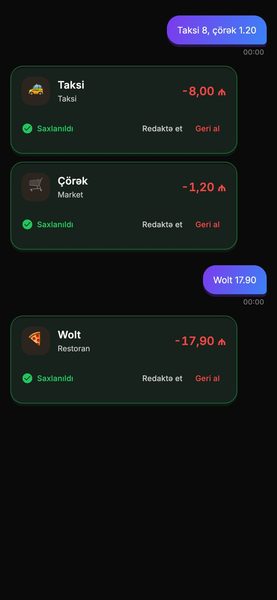
One line typed, two transactions saved.
Chat is Cashera's home screen. Every message becomes transaction cards: category icon, name, amount, and status. A card awaiting confirmation has three buttons: Confirm, Edit, Delete. A saved card can be undone with one tap.
- Many expenses in one message. “Taxi 8, bread 1.20, Wolt 17.90” splits into three cards.
- Income the same way. “Salary 1200” is a green card, “+1,200.00 ₼”.
- Categories learn. Correct it once and it sorts correctly next time.
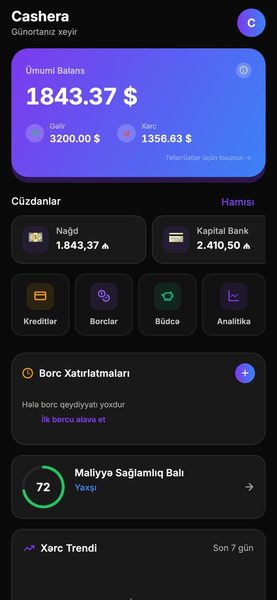
All your money on one screen, every wallet in its place.
Cash, bank card, savings account, and currency wallets are tracked separately. The balance card shows the overall picture; the rows below show this month's income and spending. Tap a wallet to see all its transactions.
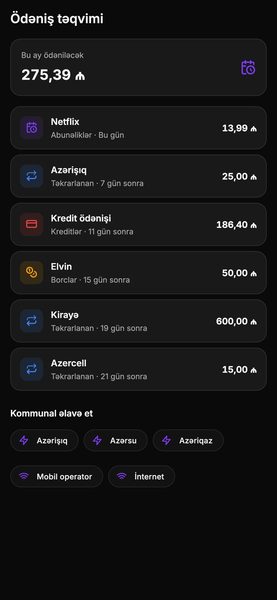
What's due this month, when, and how much.
Rent, utilities, loans, internet, subscriptions. Each one sits on the calendar with its date, with the month's total at the top: “Due this month 275.39 ₼”. When paid, the calendar rolls to next month and the expense is logged automatically.
- Reminders: a notification before each payment, timing is yours.
- Recurring suggestion: the app notices repeat spending at the same merchant and offers to add it to the calendar.
- Relative dates: “Today”, “In 7 days”, “3rd arrival”.
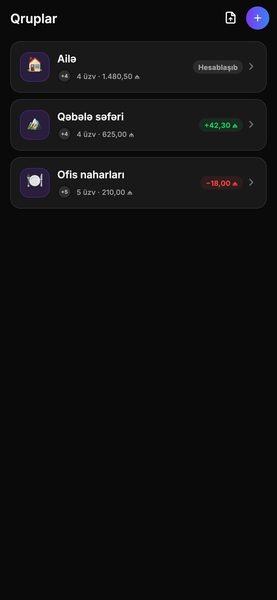
Shared spending, exact split.
Family budget, flatmates, trips, or lunch with colleagues. Log the expense to a group, pick the participants, and Cashera calculates the split and outstanding balances. Each member adds from their own phone; everyone sees the same list.
- Equal or custom split. Chosen per expense.
- Settle up: who pays whom and how much, with the fewest transfers.
- Quick-add sheet has a dedicated “Group expense” button.
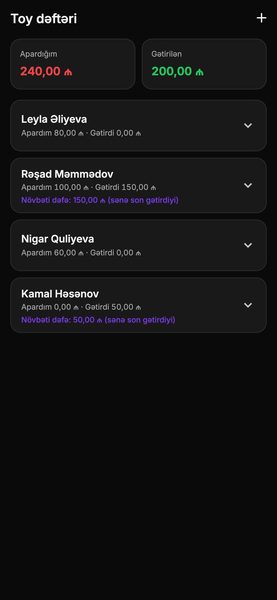
Keep the tradition in a digital ledger.
Wedding, engagement, birthday, henna night. Gifts and money guests brought in one list; the gifts you gave, separately. Years later, “what did we give them” is one search away.
- Ledger per event: each event has its own list and total.
- Money and items: an amount or a description of the gift.
- Search and export: find by name, share the list.
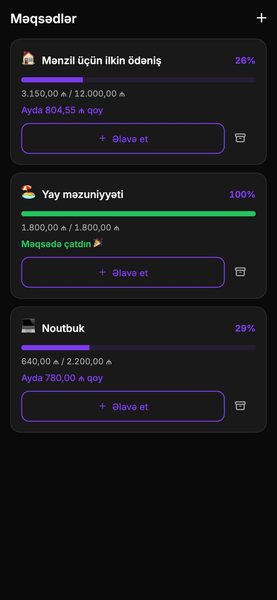
Goal, date, monthly share. The rest is progress.
Enter the goal and the date; the app calculates how much to set aside each month. Every deposit fills the progress bar. Several goals can run in parallel.
- Linked to a wallet: savings come from a separate wallet, your balance stays clean.
- If you fall behind, the app shows the new monthly share.
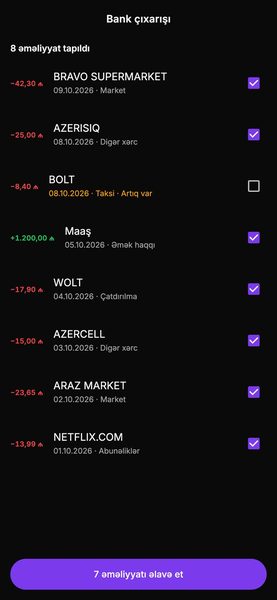
Bring in old transactions with one file.
Upload a bank statement (PDF, CSV, Excel) or an export from another app. Cashera reads the rows, recognizes dates and amounts, finds duplicates against what's already logged, and categorizes everything. You review and confirm before import.
- Bank statements: formats of Azerbaijani banks are recognized.
- Duplicate check: the same transaction is never written twice.
- Export: take your data back as CSV at any time.
Cash register, invoices, and ERP for small business. Same app.
Shops, car washes, service points, small workshops. Turn on business mode: “Dashboard” becomes the company dashboard, cash register and invoices live in the app, and the wider ERP sections open on the web. Personal and company money never mix.
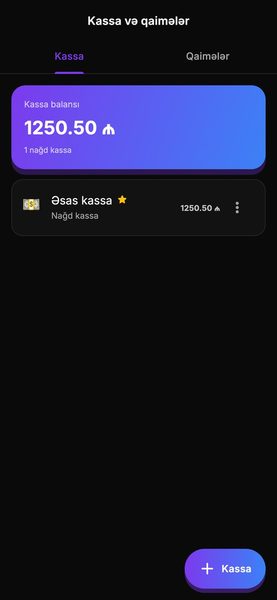
Cash register
Cash and bank registers, daily receipts and payments, shift close. The register balance is exact at any moment.
Invoices
Issue an invoice to a customer, track payment, see the outstanding balance. A paid invoice lands in the register automatically.
Web ERP
A wider panel in the browser: industry modules (for example “Wash” for car washes), reports, staff. Same data and design as the app.
Team and roles
The cashier sees only the register, the accountant sees reports, the owner sees everything. Every transaction records who made it.
Born in Azerbaijan, works in 7 languages.
The app speaks your language: screens, categories, notifications, and speech recognition. Money format, dates, and currency follow each language's own rules.
Expense: minus sign, manat after the amount, space as thousands separator.
Income: green, plus sign. Color is used only for meaning.
Dates in local format; relative in lists: “Today”, “In 7 days”.
Start free. Move to Plus when you need it.
Daily logging and the dashboard are free for everyone. Plus unlocks more wallets, import, and business features. Current pricing and plan contents are in the app's “Plans” section.
Cashera
The essential set for personal finance.
- Logging by chat, voice, and receipt
- Dashboard, categories, payment calendar
- Savings goals and gift ledger
- Dark and light theme, 7 languages
No card required.
Cashera Plus
For heavy use and small business.
- Everything in the free plan
- Unlimited wallets and groups
- Bank statement import and export
- Business mode: cash register, invoices, web ERP
- Priority support
Price in the app, by country. Cancel anytime.
The data is yours. We only store it.
Cashera never asks for access to your bank account and stores no card details. What you write is all there is.
Encrypted in transit and at rest
All traffic between device and server is encrypted; data is stored encrypted on the server.
Device lock
App lock with Face ID, fingerprint, or PIN. Amounts can be hidden in notifications.
Export and delete
Download all your data as CSV at any time. Deleting the account is one button; data is fully removed.
No bank access
Auto-capture reads only the phone's notifications and never connects to your bank. Switch it off at any time.
Frequently asked questions
Does Cashera connect to my bank account?
No. The app never asks for bank access. Auto-capture reads bank notifications on Android and works through a Shortcut on iOS. Older transactions can be imported from a bank statement file.
What if an expense is recognized incorrectly?
Every transaction card has “Edit” and “Undo”. When you correct the category, the app learns and sorts the same merchant correctly next time.
What is business mode and who needs it?
It's for people running a shop, car wash, service point, or small workshop. A company space opens separately from personal wallets: cash register, invoices, team roles. Wider modules (reports, industry sections) live in the web ERP and open from inside the app.
Which devices does it run on?
iPhone and Android phones, with a home screen widget. The web ERP for business opens in any browser. One account, data syncs across devices.
Can I get my data back?
Yes. All transactions export to CSV. When you delete the account, the data is fully removed from the server.
Can I use currencies other than manat?
Yes. Each wallet has its own currency: dollar, euro, lira, ruble, som, tenge, and others. The dashboard shows the total balance in your main currency.

Log your first expense today.
Setup takes a minute. No card, no bank access required.